Use a skill to start a task
Skills give you a starting prompt or guided workflow for common tasks. Use one when you know the outcome you want and would like help structuring the request.
Try a writing skill
Section titled “Try a writing skill”- Open Skills.
- Select Writing.
- Read /rewrite and choose Try in Chat.
- Complete the prefilled prompt’s tone, audience, length, and text.
- Review the request and send it.
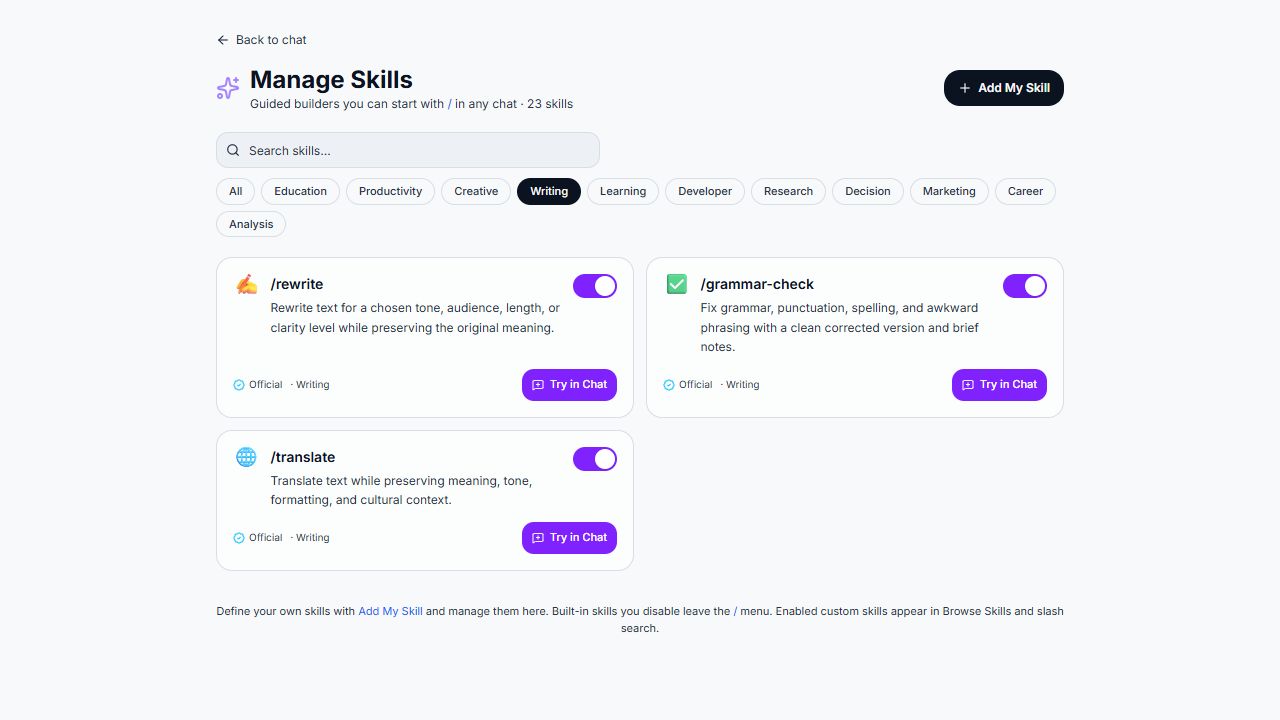
The rewrite link was verified to prefill a new chat without sending automatically.
Try a friendly tone, a project-team audience, and a one-sentence target. Supply the actual text you want rewritten.
Find other skills
Section titled “Find other skills”Use categories and search to find tasks such as summarizing, meeting notes, action plans, translation, research, and code review. Read the description to understand what each skill is meant to produce.
The chat box also offers / for skills. An enabled skill can appear in the slash menu. The Skills Hub notes that disabling built-in skills removes them from that menu.
Custom skills
Section titled “Custom skills”Add My Skill is the entry point for defining your own skill where available. A useful custom skill has a narrow purpose, clear instructions, and an expected output. Avoid making one broad skill responsible for every kind of work. Custom creation and its current form fields require a separate verified walkthrough.