Control when ChatterMate searches the web
Use web search when your question depends on recent information or sources you want to inspect. Search preferences control how eagerly the assistant reaches for the web.
Choose a search preference
Section titled “Choose a search preference”- Open Settings → Web Search.
- Under When to search, choose the behavior that suits your work.
- Review preferred topics and source preferences if you want to guide results.
- Return to Chat and ask your question.
| Mode | Meaning shown in the application |
|---|---|
| Smart | Search when the question appears to need fresh information |
| Always | Search on every message |
| Never | Answer from the model’s own knowledge |
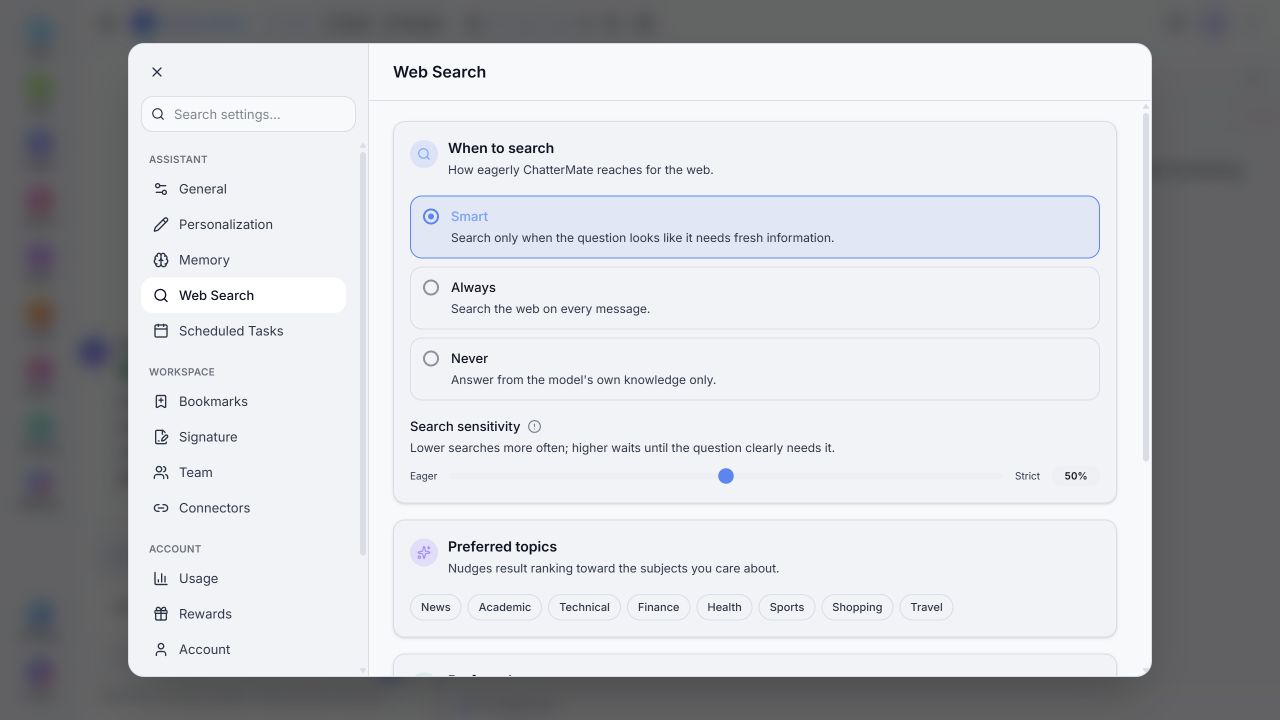
Local settings view. Search completion and source filtering need deployment-specific verification.
Search sensitivity adjusts how readily Smart searches. Preferred sources rank selected domains higher; blocked sources are described as excluded from results. Enter a domain such as example.com in the relevant list.
Review an answer with sources
Section titled “Review an answer with sources”When sources are provided, open those relevant to your decision and check their dates and claims. Ask the assistant to distinguish confirmed facts from estimates. Setting Never does not make an answer suitable for time-sensitive questions.
Example: Find recent announcements about this product. Include the announcement date and source link for each item.