Create and manage an API key
An API key authorizes programmatic access associated with your account. Keep the raw key in server-side configuration.
Create a key
Section titled “Create a key”- Open Settings → API Keys.
- Enter a name that identifies the application using it.
- Review Rate (req/min).
- Choose an expiry option.
- Select Create when ready to issue a credential.
- Save the raw key immediately in your intended secret store.
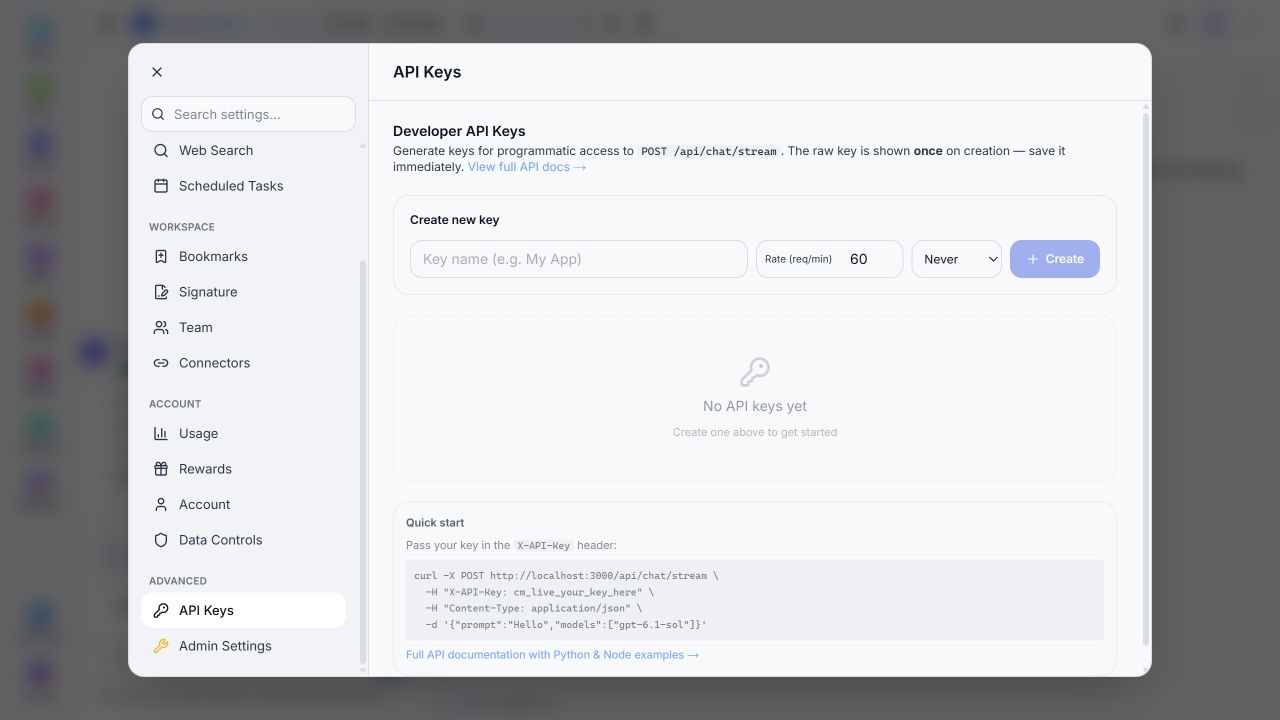
Form inspected locally. No key was issued or included in this documentation.
The interface states that the raw key is shown once. The local expiry choices were Never, 90 days, 180 days, and 365 days. The rate field defaulted to 60 requests per minute; use the value assigned to your key rather than assuming every key uses that default.
Do not embed a key in a public webpage, client bundle, screenshot, or repository. If a key is lost, create a replacement rather than expecting the full secret to appear again in the list. If a key is exposed, replace it and revoke the exposed credential using the available controls.
For an expired key or rejected request, check key status, expiry, scope, and the response message. The reviewed middleware can distinguish missing scope from an invalid key.