Build a Knowledge Base and check grounded answers
Use Agentic RAG or Knowledge to manage reusable source documents and ask questions against them. A normal chat attachment, project context, and an indexed Knowledge Base are related tools with different scopes.
Add and inspect a source
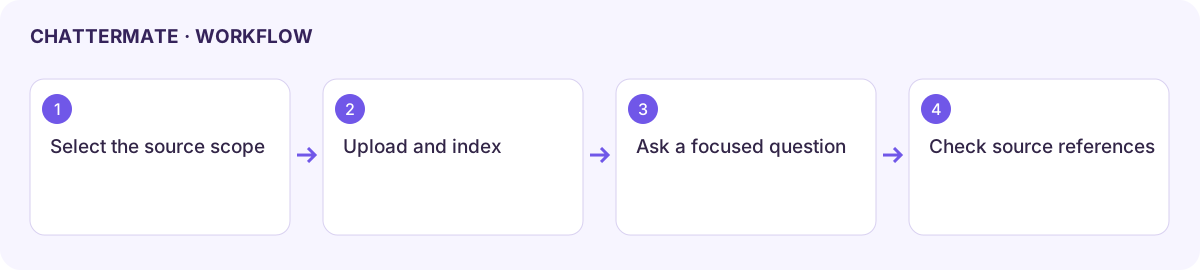
Section titled “Add and inspect a source”- Open Agentic RAG from the sidebar, or Knowledge in the context panel. Check the selected project or knowledge scope before adding a document.
- Choose Upload documents, Browse files, or drop files into the upload area. The reviewed uploader lists PDF, Office documents, images, TXT, and CSV, with a displayed limit of 100 MB; follow the current uploader’s limits.
- Wait for processing. Use Processing, Indexed, and Error filters to distinguish an upload from a usable source.
- Open document details and check the filename, status, and available chunk or word information. Use Refresh documents after processing or a retry.
- For Scrape URL, use a page you are permitted to access and check the extracted material. A successful page fetch does not guarantee complete or current content.
Ask a question you can verify
Section titled “Ask a question you can verify”Ask for a narrow answer and name the source: “Using the launch brief, list the deadlines and flag anything not specified.” Inspect the answer’s source references and compare important details with the original file. A confident reply without supporting source material needs further checking.
Search and sort the document list, or switch between Grid, List, and Table views to inspect a larger collection. The available analytics view helps inspect the collection; document counts alone do not prove answer quality.
Fix a retrieval problem
Section titled “Fix a retrieval problem”| Symptom | Next step |
|---|---|
| File appears but answers ignore it | Confirm it is indexed and in the current scope. |
| Processing error | Open the status detail, check format and file size, then retry. |
| Wrong or incomplete evidence | Inspect extracted content and use a clearer source or question. |
| Outdated answer | Check the document version and refresh the source through available controls. |
Next: file questions and project context.
Indexed launch brief with extracted text, source status, and document actions.
A grounded date and open-decision answer with its source reference.
Workflow at a glance
Section titled “Workflow at a glance”